How to Create a YouTube Script Workflow With AI
Writing YouTube scripts doesn't have to start with a blank page. Learn how to use AI to research topics, validate ideas, create engaging hooks, structure videos, write natural scripts, plan B-roll, and repurpose videos into multiple content formats with a repeatable workflow.
How to Create a YouTube Script Workflow With AI
Creating a successful YouTube video involves far more than simply turning on a camera and speaking. Behind every engaging video is a structured workflow that includes researching ideas, validating audience interest, writing an engaging script, planning visuals, recording, editing, and optimizing for discoverability.
For many creators, scripting is the most time-consuming stage of this process. It often takes longer to organize thoughts, structure the narrative, and refine the script than it does to record the actual video.
Artificial intelligence changes that.
Instead of staring at a blank document wondering how to begin, creators can use AI to accelerate research, organize ideas, generate outlines, improve clarity, and assist with scripting while still keeping complete creative control.
This guide explains how to build a practical AI-powered YouTube scripting workflow that helps you create better videos faster without making your content sound robotic or generic.
Who This Guide Is For
This workflow is designed for creators producing educational, informational, or business-related videos.
It is especially useful for:
Educational YouTubers
Tech creators
Business channels
SaaS founders
Course creators
Marketing professionals
Freelancers
Coaches
Small businesses
Anyone building a personal brand through YouTube
Whether you're publishing one video each month or several every week, having a repeatable scripting workflow makes production significantly easier.
Why Writing YouTube Scripts Takes So Long
Many creators assume recording is the hardest part of making videos.
In reality, scripting often consumes the most time because it involves dozens of creative decisions.
You need to determine:
What problem the video solves.
Who the audience is.
How to capture attention.
Which points to include.
What examples to use.
How to maintain viewer retention.
Where visuals should appear.
How to conclude effectively.
Without a structured process, creators frequently rewrite sections multiple times before they're satisfied.
AI helps reduce this friction by assisting with planning rather than replacing creative thinking.
Why AI Should Support Storytelling, Not Replace It
One of the biggest misconceptions about AI is that it should write an entire YouTube script from beginning to end.
While it certainly can generate scripts, the strongest videos still rely on the creator's own expertise, experiences, and personality.
Think of AI as a production assistant.
It can help:
Research topics.
Generate outlines.
Improve clarity.
Rewrite awkward sections.
Suggest examples.
Plan visuals.
Generate title ideas.
Create descriptions.
Your role is to decide what deserves to be included and how your audience should experience the story.
The result is a script that feels authentic while taking much less time to produce.
The Complete AI YouTube Workflow
Instead of thinking only about script writing, view your workflow as a complete production system.
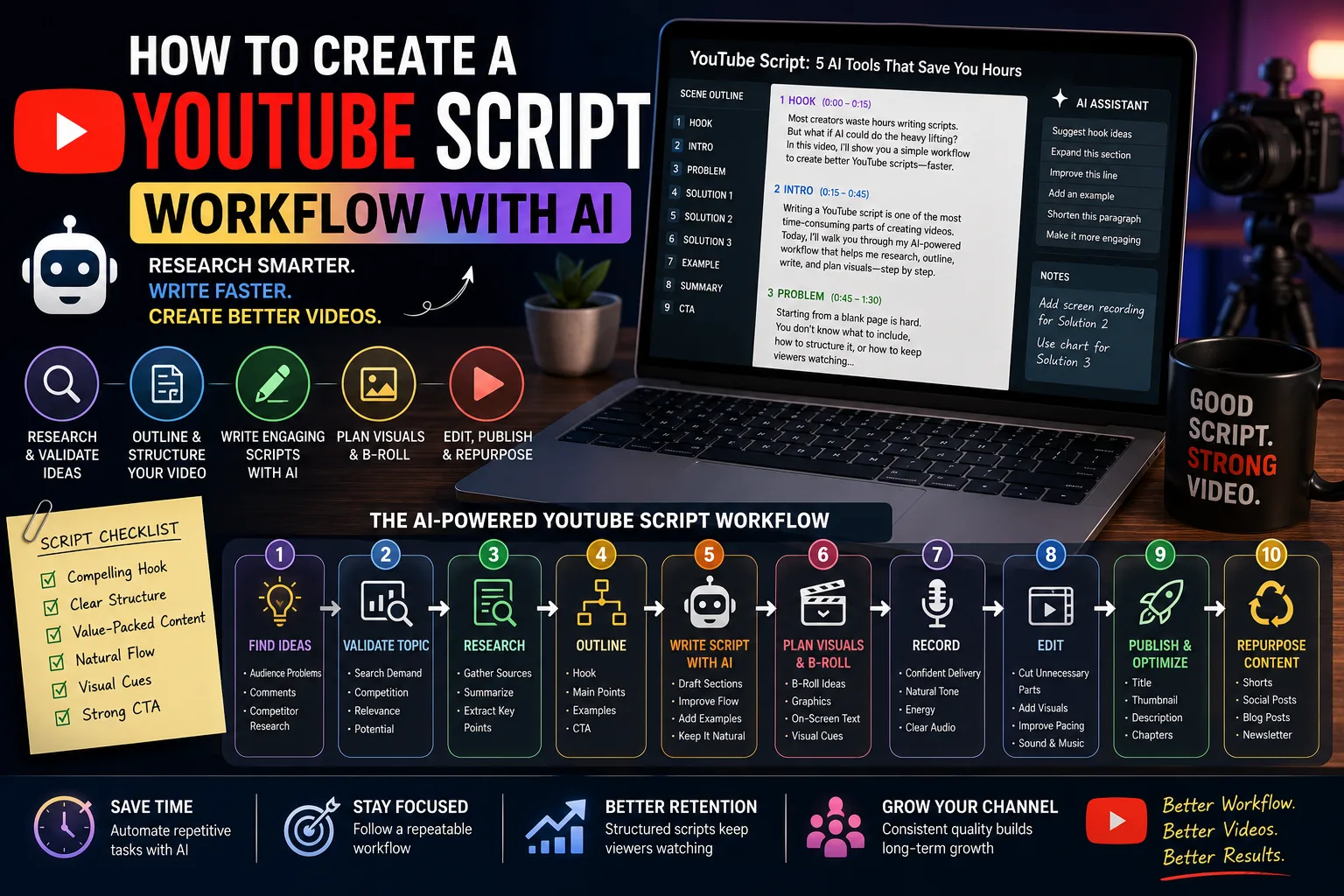
A practical workflow looks like this:
Find video ideas.
Validate audience demand.
Research the topic.
Build the outline.
Write the script.
Plan visuals.
Record the video.
Edit.
Publish.
Repurpose content.
Each stage builds naturally upon the previous one, making production more predictable and consistent.
Step 1: Find Video Ideas Worth Creating
Every successful video starts with solving a problem.
Rather than asking AI:
"Give me YouTube ideas."
Begin with your audience.
Ask questions like:
What questions do beginners ask repeatedly?
What problems remain unsolved?
Which misconceptions exist?
Which tutorials are outdated?
Which topics deserve a simpler explanation?
Collect ideas from:
YouTube comments
Community posts
Reddit discussions
Google search suggestions
Customer questions
Support emails
Industry forums
Competitor videos
Once you've gathered enough material, AI can organize these ideas into themes.
Step 2: Validate Audience Interest
Not every interesting topic deserves a video.
Before investing hours into scripting and editing, determine whether people actually care about the subject.
Useful questions include:
Does this solve a real problem?
Is the topic evergreen?
Can I provide a unique perspective?
Does it support my existing content?
Will viewers benefit immediately?
AI can help compare multiple ideas and suggest which topics align best with your content strategy.
Validation saves time by preventing videos that are unlikely to perform well.
Step 3: Research Like a Creator, Not a Script Generator
Good videos begin with reliable research.
Instead of asking AI to explain everything, gather information from trustworthy sources first.
Examples include:
Official documentation
Industry reports
Academic research
Product websites
Interviews
Podcasts
Case studies
Books
Your own experience
Once you've collected your research, AI can:
Summarize information.
Compare viewpoints.
Simplify technical concepts.
Organize notes.
Identify missing sections.
Suggest follow-up questions.
This creates a stronger foundation than relying entirely on AI-generated knowledge.
Step 4: Build the Outline Before Writing
Many creators jump directly into scripting.
A better approach is to build an outline first.
A simple YouTube outline often includes:
Hook
Capture attention within the first few seconds.
Explain why viewers should continue watching.
Introduction
Introduce the problem and set clear expectations.
Tell viewers exactly what they'll learn.
Main Sections
Break the topic into logical segments.
Each section should naturally lead into the next.
Practical Example
Show the concept in action.
Examples improve understanding and increase viewer trust.
Summary
Review the key points.
Reinforce the main takeaway.
Call to Action
Invite viewers to continue learning.
This could involve watching another related video, subscribing, or visiting your website.
Planning the structure before writing dramatically reduces editing later.
Step 5: Write Better Hooks With AI
The first few seconds determine whether viewers continue watching.
Instead of generic introductions like:
"Hello everyone, welcome back to another video..."
Start by addressing a problem.
Examples include:
"Most creators waste hours writing YouTube scripts. Here's a faster workflow."
"If your videos struggle to keep viewers watching, your script may be the real problem."
"One simple workflow can cut your scripting time in half."
AI can generate multiple hook variations, allowing you to select the one that best fits your audience and style.
Remember that curiosity, relevance, and clarity usually outperform exaggerated promises.
Step 6: Let AI Draft the First Version
Once the outline is complete, AI can expand each section into a conversational script.
Rather than requesting an entire script in one prompt, generate it section by section.
This offers several advantages:
Better consistency.
Easier editing.
Improved accuracy.
More natural pacing.
Stronger transitions.
You remain in control while AI handles repetitive drafting.
Step 7: Plan Visuals While Writing
Great YouTube videos aren't built from narration alone.
Visual planning should happen during scripting rather than after recording.
For each section, identify supporting visuals such as:
B-roll footage
Screen recordings
Product demonstrations
Graphs
Charts
Animations
Text overlays
Infographics
Camera angle changes
A simple planning table can help.
Script Section | Suggested Visual |
|---|---|
Hook | Fast-paced montage or problem demonstration |
Research | Screen recording of research sources |
Workflow | Animated process diagram |
Example | Live demonstration |
Summary | Key takeaway graphics |
Planning visuals early reduces editing time and creates a smoother viewing experience.
Step 8: Keep the Script Conversational
One of the easiest ways to identify an AI-written script is by reading it aloud.
If it sounds unnatural, your audience will notice as well.
When reviewing your script, ask:
Would I actually say this?
Is this sentence too long?
Does this sound conversational?
Am I repeating myself?
Can I simplify this explanation?
AI can help rewrite awkward paragraphs, but the final script should always reflect your own speaking style.
A useful guideline is to write for the ear rather than the eye. Viewers don't read your script. They listen to it.
Step 9: Edit for Retention, Not Just Grammar
Many creators think editing is about fixing grammar and removing mistakes.
On YouTube, editing the script is really about maintaining viewer attention.
Every sentence should encourage viewers to continue watching.
Ask yourself:
Does this section answer an important question?
Is this explanation too long?
Can this example be simplified?
Would I continue watching this video?
AI can help identify repetitive wording, simplify complex explanations, and improve transitions between sections.
However, you should still read the script aloud.
If something feels awkward to say, it will probably sound awkward to viewers.
Step 10: Generate Better Titles With AI
A great video with a weak title often struggles to reach its audience.
Instead of generating one title, ask AI for multiple variations.
Experiment with different approaches.
Problem-Based
Why Most YouTube Scripts Fail
Stop Wasting Hours Writing YouTube Scripts
Solution-Based
The AI Workflow That Makes YouTube Scripting Faster
Create Better YouTube Scripts With AI
Curiosity-Based
I Changed One Thing About My Script Workflow...
This AI Workflow Completely Changed My Video Process
Comparison-Based
Manual vs AI YouTube Scripting
ChatGPT vs Claude for YouTube Scripts
Once you have several options, choose the one that accurately represents the video while creating genuine curiosity.
Avoid misleading titles simply to increase clicks.
Step 11: Use AI to Improve Thumbnails
Although AI cannot replace good design principles, it can accelerate the creative process.
Ask AI to help with:
Thumbnail concepts
Text overlay ideas
Visual composition
Color suggestions
Emotional direction
Object placement
For educational channels, simplicity often performs better than overly complex designs.
A thumbnail should communicate one idea at a glance.
Step 12: Generate Supporting Assets
Your workflow shouldn't end after the script is complete.
AI can also create:
Video descriptions
Chapter timestamps
Frequently asked questions
Comment prompts
Community posts
Newsletter summaries
Blog article drafts
Social media captions
This saves significant time while maintaining consistency across platforms.
Step 13: Repurpose Every Video
Every finished YouTube video contains multiple smaller content opportunities.
Instead of creating new ideas from scratch, extract valuable moments from the existing video.
Examples include:
YouTube Video | Repurposed Content |
|---|---|
Full Tutorial | YouTube Shorts |
Full Tutorial | LinkedIn Post |
Full Tutorial | X Thread |
Full Tutorial | Newsletter |
Full Tutorial | Instagram Carousel |
Full Tutorial | Blog Article |
Full Tutorial | Email Campaign |
One well-produced video can support an entire week's content schedule.
This dramatically improves the return on the time invested in research, scripting, and editing.
Measure What Actually Improves Your Videos
Publishing consistently is important.
Learning from your analytics is even more valuable.
Review metrics such as:
Click-through rate
Average view duration
Audience retention
Watch time
Returning viewers
Subscriber growth
Comments
Shares
Patterns matter more than individual videos.
Questions worth asking include:
Which hooks keep viewers watching?
Which topics generate the most watch time?
Where do viewers leave the video?
Which thumbnails receive the highest click-through rates?
Use these insights to improve your future scripts.
Build a Repeatable YouTube Workflow
Rather than reinventing your production process for every video, create a repeatable system.
A practical workflow might look like this:
Find Topic
│
▼
Validate Audience Interest
│
▼
Research
│
▼
Create Outline
│
▼
Write Script With AI
│
▼
Plan B-Roll & Visuals
│
▼
Record
│
▼
Edit
│
▼
Create Thumbnail & Title
│
▼
Publish
│
▼
Repurpose Content
│
▼
Analyze Performance
Following the same workflow every time reduces decision fatigue and helps maintain quality across every video.
Common AI YouTube Scripting Mistakes
AI can dramatically accelerate scripting, but only when used thoughtfully.
Avoid these common mistakes.
Letting AI Write Everything
Videos feel more authentic when they include your experiences, opinions, and personality.
AI should support your ideas, not replace them.
Ignoring Viewer Retention
Many scripts explain information well but fail to maintain curiosity.
Introduce questions, examples, demonstrations, and transitions that encourage viewers to keep watching.
Writing Like an Article
A YouTube script should sound conversational.
Shorter sentences, natural pauses, and spoken language usually perform better than highly formal writing.
Forgetting Visual Planning
Don't wait until editing to decide which visuals to use.
Planning graphics, B-roll, and demonstrations while writing makes production significantly smoother.
Publishing Without Optimization
Titles, thumbnails, descriptions, chapters, and metadata all influence discoverability.
Treat them as part of your workflow rather than afterthoughts.
Frequently Asked Questions
Can AI write an entire YouTube script?
Yes, but it shouldn't replace your expertise.
AI works best as a drafting assistant while the creator remains responsible for storytelling, examples, and final editing.
Should I memorize AI-generated scripts?
Not necessarily.
Many creators use scripts as structured guides rather than reading them word for word.
Speaking naturally usually creates a stronger connection with viewers.
Can AI help improve audience retention?
Indirectly.
AI can suggest stronger hooks, improve structure, and simplify explanations, but understanding your audience remains the most important factor.
How long should a YouTube script be?
That depends on your video.
Instead of aiming for a specific word count, focus on answering the viewer's question as clearly and efficiently as possible.
YouTube Script Checklist
Before recording your next video, review the following checklist:
□ Validate that the topic solves a real audience problem.
□ Gather reliable research from trusted sources.
□ Create a structured outline.
□ Write a compelling hook.
□ Generate the script section by section.
□ Plan visuals and B-roll alongside the script.
□ Read the script aloud and improve natural flow.
□ Create multiple title options.
□ Brainstorm thumbnail concepts.
□ Prepare descriptions, chapters, and supporting assets.
□ Repurpose the finished video into multiple content formats.
□ Review analytics to improve the next video.
Final Takeaway
AI doesn't create successful YouTube channels. Consistent systems do.
The creators who benefit most from AI aren't the ones generating entire videos with a single prompt. They're the ones using AI to remove repetitive work while keeping their own expertise, storytelling, and personality at the center of every video.
A structured workflow transforms YouTube production from a collection of disconnected tasks into a repeatable process. Research becomes faster, scripting becomes easier, visual planning becomes more organized, and every published video creates opportunities for additional content across multiple platforms.
The goal isn't simply to produce more videos. It's to create better videos with less wasted effort. When AI handles the routine work, you gain more time to focus on what viewers actually remember: clear ideas, authentic communication, and valuable content. Those qualities are still difficult to automate, and they're exactly what keeps audiences coming back.