Best AI Tools for Repurposing One Article Into Social Posts
Creating great content takes time, so every article should work harder. Discover the best AI tools for transforming a single blog post into LinkedIn posts, X threads, Instagram captions, newsletters, YouTube scripts, and more with a repeatable content repurposing workflow.
Best AI Tools for Repurposing One Article Into Social Posts
Creating high-quality content is one of the most time-consuming tasks for creators. Research, outlining, writing, editing, designing visuals, and publishing can take several hours, sometimes even days, for a single article.
Yet many creators make the same costly mistake.
They publish one blog post, share it once on social media, and immediately move on to creating something new.
In reality, one well-researched article can become dozens of valuable content assets. A detailed blog post can be transformed into LinkedIn posts, X (formerly Twitter) threads, Instagram carousels, newsletters, YouTube scripts, short-form videos, email sequences, and even podcast talking points.
Artificial intelligence makes this process significantly faster. Instead of manually rewriting the same ideas for every platform, AI can adapt your content into multiple formats while preserving the original message and saving hours of repetitive work.
This guide explores the best AI tools for content repurposing, explains where each tool performs best, and shows you how to build a repeatable workflow that maximizes the value of every article you publish.
Who This Guide Is For
This workflow is useful for anyone who creates educational or marketing content on a regular basis.
It is especially valuable for:
Bloggers
YouTubers
Newsletter writers
Freelancers
Content marketers
SaaS founders
Personal brand creators
Marketing agencies
Small business owners
Whether you publish one article each week or manage an entire content team, repurposing allows you to produce more content without starting from scratch every time.
Why Repurposing Matters More Than Creating More Content
Many creators believe growth comes from publishing more often.
In reality, growth usually comes from getting more value out of the content you've already created.
Imagine spending six hours writing an in-depth article.
Publishing it only once means those six hours produce a single asset.
Repurposing transforms that same effort into multiple pieces of content, each reaching a different audience on a different platform.
For example:
One article can become:
Three LinkedIn posts
Two X threads
One newsletter
One Instagram carousel
One YouTube script
Several short-form video ideas
Multiple email snippets
FAQ content
Community discussion prompts
Instead of creating ten separate pieces of content, you create one excellent article and intelligently adapt it.
This approach saves time while improving consistency across every channel.
Why AI Has Changed Content Repurposing
Before AI became widely available, repurposing required manually rewriting the same information for every platform.
Today, AI can:
Extract key insights
Rewrite content for different audiences
Adjust tone
Change formatting
Generate captions
Create summaries
Suggest headlines
Produce multiple variations
This doesn't eliminate human involvement.
Instead, it removes repetitive rewriting so creators can focus on strategy, storytelling, and quality.
Think of AI as a content adaptation assistant rather than an automatic publishing machine.
The Modern Content Repurposing Workflow
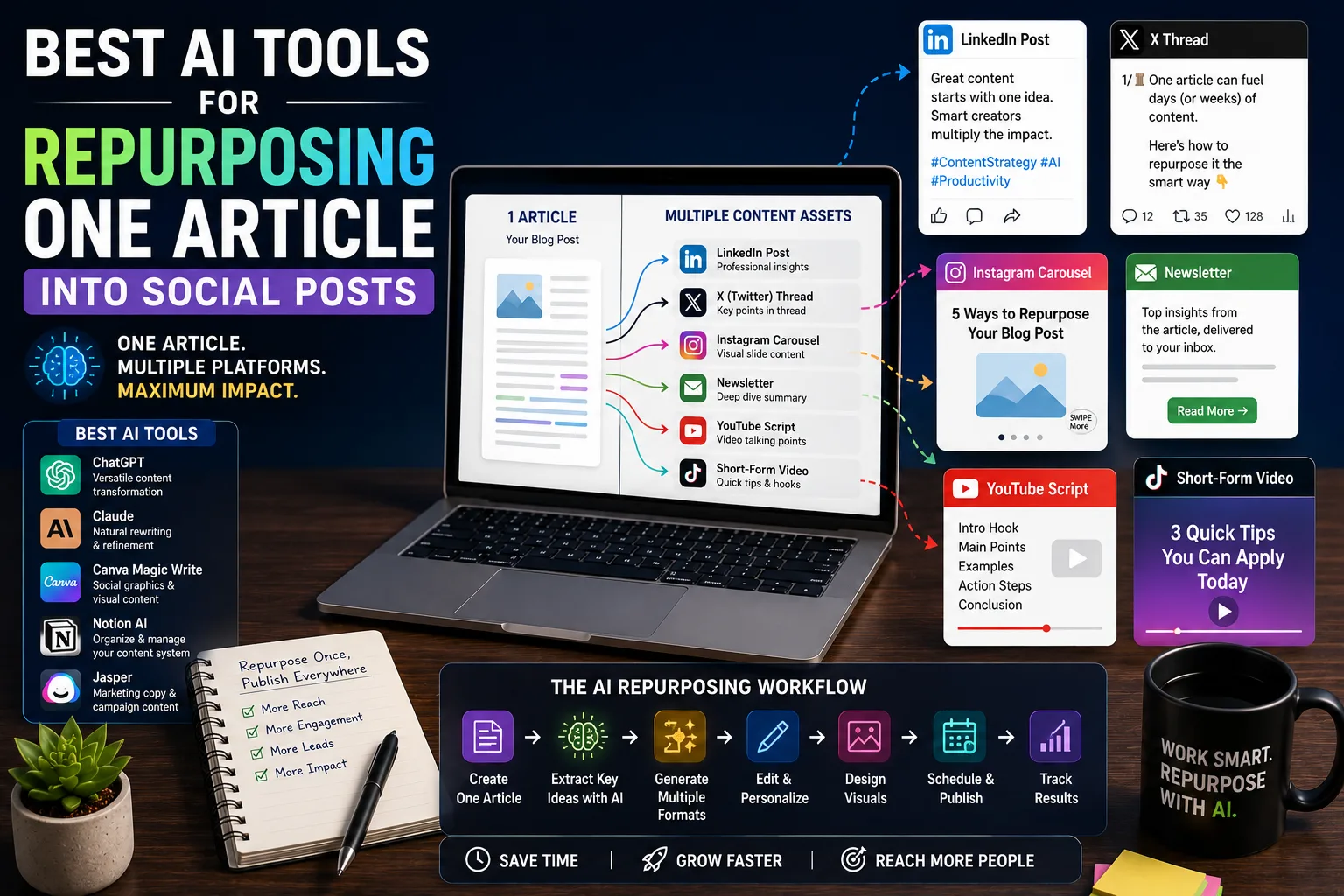
An effective workflow follows a simple sequence:
Create one high-quality article.
Identify key ideas.
Break the article into smaller sections.
Match each section to a platform.
Adapt the tone and format.
Design supporting visuals.
Schedule publication.
Measure performance.
Each step builds on the previous one, ensuring that every new asset remains connected to the original content.
What Makes a Good AI Repurposing Tool?
Not every AI writing tool is designed for content repurposing.
Before choosing a tool, consider whether it helps you:
Preserve your original message
Adapt content for different platforms
Maintain your writing style
Produce multiple variations
Save time without sacrificing quality
Integrate into your existing workflow
The best tools don't simply shorten articles.
They transform content while respecting the expectations of each platform.
Tool 1: ChatGPT
Best for: Flexible content transformation and multi-platform workflows.
ChatGPT is one of the most versatile tools available for repurposing long-form content.
Instead of relying on fixed templates, it allows creators to provide detailed instructions tailored to specific platforms.
For example, you can ask it to:
Convert an article into a LinkedIn post.
Rewrite it as an X thread.
Summarize it into a newsletter.
Create Instagram carousel copy.
Generate YouTube talking points.
Produce multiple headline options.
Rewrite content for beginners or professionals.
Its flexibility makes it suitable for creators who publish across several platforms.
Strengths
Highly customizable
Excellent prompt support
Works across multiple formats
Strong at structured outputs
Ideal for building repeatable workflows
Best Use Case
Creators managing blogs, newsletters, social media, and educational content from a single source.
Tool 2: Claude
Best for: Natural rewriting and long-form refinement.
Claude is particularly useful when the goal is preserving readability.
Rather than aggressively restructuring content, it often maintains the flow of the original article while adapting it to a different format.
Many creators use Claude to:
Rewrite articles naturally.
Improve newsletter copy.
Create opinion pieces.
Edit long documents.
Simplify complex explanations.
Strengths
Smooth writing style
Excellent readability
Strong document handling
Human-like tone
Best Use Case
Creators prioritizing high-quality writing over aggressive automation.
Tool 3: Canva Magic Write
Best for: Social media graphics and visual content.
Repurposing isn't limited to text.
Many platforms rely heavily on visual communication.
Canva's AI features help creators generate:
Instagram carousel copy
Graphic text
Presentation outlines
Social media captions
Marketing visuals
Because the writing and design tools exist within the same platform, creators can move from text generation to finished graphics without switching applications.
Strengths
Built-in design tools
Easy visual creation
Beginner-friendly
Fast content production
Best Use Case
Creators producing visual-first content for Instagram, LinkedIn, and Pinterest.
Tool 4: Notion AI
Best for: Organizing content systems.
Notion AI focuses less on publishing and more on content management.
It helps creators:
Summarize articles.
Generate action items.
Organize research.
Build content calendars.
Store reusable assets.
Create publishing checklists.
Combined with a structured workspace, it becomes the central hub for your entire repurposing workflow.
Strengths
Excellent organization
Knowledge management
Workflow documentation
Content planning
Best Use Case
Creators managing large content libraries and editorial systems.
Tool 5: Jasper
Best for: Marketing-focused content adaptation.
Jasper provides templates specifically designed for marketing content.
These include:
Ad copy
Product descriptions
Social captions
Email campaigns
Marketing headlines
Its structured templates make it attractive for businesses producing promotional content at scale.
Strengths
Marketing templates
Brand voice features
Campaign-focused workflows
Team collaboration
Best Use Case
Marketing teams and agencies creating client campaigns.
Combining Multiple Tools Into One Workflow
Many experienced creators don't rely on a single AI tool.
Instead, they build a workflow where each tool performs the task it's best suited for.
For example:
Research & Outline
→ ChatGPT
↓
Natural Editing
→ Claude
↓
Knowledge Management
→ Notion AI
↓
Graphic Design
→ Canva
↓
Publishing & Scheduling
→ Social media scheduling platform
This approach creates a more efficient workflow than forcing one tool to handle every task.
Practical Example: One Blog Post, Multiple Content Assets
Suppose you've written a comprehensive guide titled:
"AI Workflows for Creators."
Instead of publishing only the article, AI can help transform it into:
Original Asset | Repurposed Content |
|---|---|
Blog Article | LinkedIn thought-leadership post |
Blog Article | X educational thread |
Blog Article | Newsletter edition |
Blog Article | Instagram carousel script |
Blog Article | YouTube video outline |
Blog Article | Short-form video hooks |
Blog Article | FAQ section |
Blog Article | Email campaign |
Rather than producing completely new ideas every day, you're extending the life and reach of one well-researched piece of content.
Step 6: Adapt Content Instead of Copying It
One of the biggest mistakes creators make is copying the same text onto every platform.
Each platform has its own audience, expectations, and content style.
For example:
LinkedIn rewards thoughtful professional insights.
X favors concise, fast-moving ideas.
Instagram emphasizes visuals and short captions.
Newsletters encourage deeper storytelling.
YouTube benefits from conversational scripting.
AI should help reshape the message rather than duplicate it.
A creator who understands these differences will usually outperform someone who simply reposts the same content everywhere.
End of Part 1.
Step 7: Automate Your Content Repurposing Workflow
Repurposing becomes even more powerful when combined with automation.
Instead of manually copying content between platforms, AI and automation tools can handle much of the repetitive work while you remain responsible for reviewing and approving the final output.
A typical automated workflow might look like this:
Publish Blog Article
│
▼
AI Extracts Key Ideas
│
▼
Generate Platform-Specific Content
│
├── LinkedIn Post
├── X Thread
├── Newsletter
├── Instagram Carousel Copy
└── YouTube Outline
│
▼
Review & Edit
│
▼
Schedule Posts
│
▼
Track Performance
This approach ensures every new article automatically becomes the starting point for an entire week's worth of content.
Step 8: Schedule Content Instead of Publishing Everything at Once
Many creators make the mistake of sharing every repurposed asset on the same day.
Doing so shortens the lifespan of your content.
Instead, spread your content across the week.
Example schedule:
Day | Content |
|---|---|
Monday | Publish Blog Article |
Tuesday | LinkedIn Post |
Wednesday | X Thread |
Thursday | Newsletter |
Friday | Instagram Carousel |
Saturday | Short Video |
Sunday | Community Discussion or Q&A |
This strategy allows one article to generate engagement for an entire week instead of disappearing after a single day.
Step 9: Measure Which Formats Perform Best
Not every platform will produce the same results.
Some creators discover their newsletters generate the highest conversions.
Others find LinkedIn drives the most traffic.
Some receive the strongest engagement through short-form videos.
Instead of assuming what works, measure it.
Track metrics such as:
Website traffic
Click-through rate
Newsletter sign-ups
Comments
Shares
Saves
Watch time
Conversion rate
Over time, these insights help you decide where to invest more effort.
For example, if LinkedIn consistently drives qualified visitors to your website, you might create additional LinkedIn-focused versions of every article.
Build a Content Repurposing System
Rather than deciding what to create every day, create a repeatable system.
A practical workflow might look like this.
Research
│
▼
Write One High-Quality Article
│
▼
AI Summarizes Main Ideas
│
▼
Create Social Variations
│
▼
Design Visual Assets
│
▼
Schedule Across Platforms
│
▼
Measure Results
│
▼
Improve Next Workflow
This removes decision fatigue while ensuring every piece of content contributes to your long-term content strategy.
Recommended AI Tool Stacks
Different creators have different priorities.
Below are a few practical combinations.
Solo Creator
ChatGPT
Canva
Notion AI
Ideal for creators managing everything themselves.
Blogger
ChatGPT
Claude
Notion AI
Excellent for writing, editing, and organizing long-form content.
Marketing Team
ChatGPT
Jasper
Canva
Collaboration platform
Suitable for businesses producing high volumes of marketing content.
Agency
ChatGPT
Claude
Canva
Automation platform
Project management software
Designed for managing multiple clients while maintaining consistent quality.
Common Repurposing Mistakes
Repurposing is about adapting content, not copying it.
Avoid these common mistakes.
Posting the Same Content Everywhere
Every platform has a different audience and content style.
A LinkedIn post should not look identical to an Instagram caption or an X thread.
Adapt the structure, tone, and formatting to match the platform.
Prioritizing Quantity Over Quality
Publishing ten weak posts rarely outperforms publishing three genuinely useful ones.
Focus on value rather than volume.
Ignoring Platform Features
Each platform rewards different content formats.
For example:
LinkedIn encourages thoughtful professional insights.
Instagram favors visual storytelling.
X rewards concise, high-impact ideas.
YouTube benefits from conversational scripts.
Design content for the platform rather than forcing every platform to behave the same way.
Forgetting to Update Original Articles
As your understanding improves, update your original article.
Every improved article becomes the source for stronger future repurposed content.
Think of your blog as the foundation of your content ecosystem.
Letting AI Replace Your Voice
AI can rewrite, summarize, and restructure content.
It cannot replace your experience, opinions, or perspective.
The strongest repurposed content still reflects the creator's personality and expertise.
Frequently Asked Questions
Should I repurpose every article?
Not necessarily.
Focus on your highest-quality, evergreen articles first. These provide the greatest long-term return because they remain useful for months or even years.
Which platform should I prioritize?
Start with the platform where your audience is already most active.
Once your workflow becomes efficient, expand to additional platforms rather than trying to master everything at once.
Can AI fully automate content repurposing?
AI can automate much of the drafting process, but every piece of content should still be reviewed before publishing.
A short human review helps ensure accuracy, consistency, and brand voice.
How many social posts can one article produce?
There isn't a fixed number.
A detailed, well-researched article can often generate 10 to 20 high-quality content assets across different formats without becoming repetitive.
Content Repurposing Checklist
Before publishing your next article, make sure you've completed the following:
□ Identify the article's key insights.
□ Extract memorable quotes and statistics.
□ Create platform-specific versions.
□ Rewrite content instead of copying it.
□ Design supporting visuals where appropriate.
□ Schedule posts across multiple days.
□ Monitor engagement and traffic.
□ Save successful prompts for future use.
□ Update your original article when needed.
□ Record lessons learned for future content.
Final Takeaway
The most productive creators aren't necessarily the ones creating the most content. They're the ones getting the most value from every piece they publish.
Artificial intelligence makes repurposing dramatically faster, but the real advantage comes from having a repeatable workflow. Instead of starting from a blank page every day, begin with one high-quality article and systematically transform it into multiple content formats tailored for different platforms.
Over time, this approach compounds. Every article becomes a long-term asset that continues generating traffic, engagement, and opportunities well beyond its publication date.
Your goal shouldn't be to publish everywhere for the sake of visibility. It should be to deliver the right message, in the right format, on the right platform. AI helps you do that more efficiently, but it's your insight, creativity, and understanding of your audience that ultimately make the content worth sharing. In the end, repurposing isn't about squeezing more posts out of one article. It's about making the work you've already done continue earning its keep instead of retiring after a single publication.