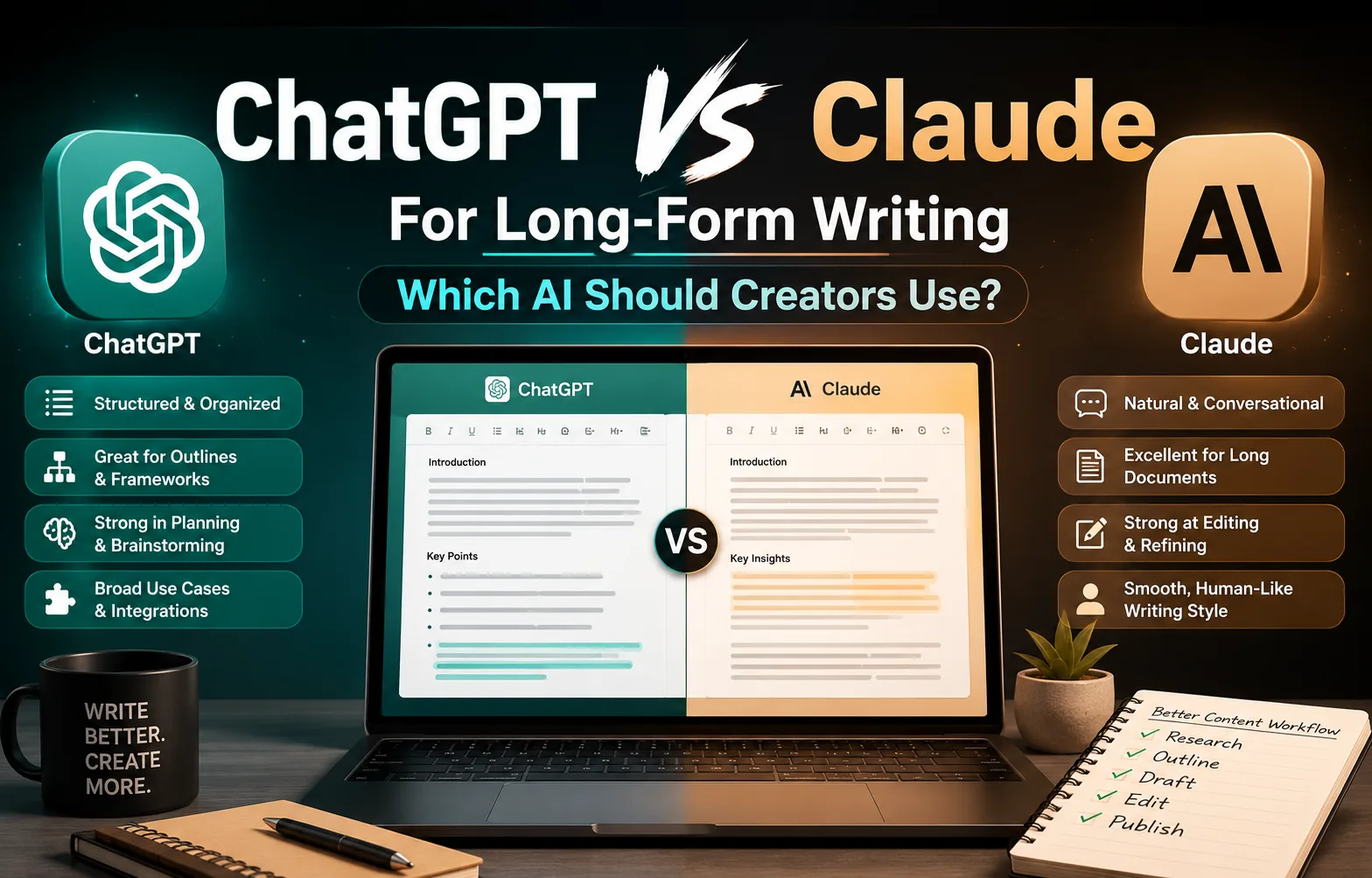
ChatGPT vs Claude for Long-Form Writing: Which AI Should Creators Use?
Choosing the right AI writing assistant can significantly improve your content workflow. This in-depth comparison explores how ChatGPT and Claude perform across research, outlining, drafting, editing, tone consistency, and long-form writing, helping creators decide which tool best fits their workflow.
ChatGPT vs Claude for Long-Form Writing: Which AI Should Creators Use?
Artificial intelligence has become an essential part of modern content creation. From brainstorming ideas to editing final drafts, AI assistants can dramatically reduce the time required to produce high-quality content.
Among the available options, ChatGPT and Claude have emerged as two of the most popular choices for writers, creators, marketers, and businesses.
But despite serving similar purposes, they approach writing differently.
Some creators prefer ChatGPT because of its versatility, ecosystem, and structured responses. Others choose Claude for its natural writing style and ability to work with lengthy documents.
The question isn't simply Which AI is better?
A better question is:
Which AI fits your writing workflow?
This guide compares ChatGPT and Claude across the areas that matter most for long-form writing, including research, outlining, drafting, editing, tone consistency, context handling, and practical workflows.
Rather than declaring a single winner, the goal is to help you understand where each tool excels and how you can use them effectively.
Who This Comparison Is For
This guide is intended for creators who regularly produce long-form content, such as:
Bloggers
Newsletter writers
YouTubers creating educational scripts
Freelance writers
Copywriters
Content marketers
SaaS founders
Agencies
Small marketing teams
Whether you're writing one article each month or publishing content daily, choosing the right AI assistant can save hours every week.
How This Comparison Was Evaluated
Instead of focusing on marketing claims or benchmark scores, this comparison looks at how each tool performs during a real content workflow.
The evaluation considers:
Idea generation
Research assistance
Outline creation
Long-form drafting
Maintaining context
Writing quality
Editing capabilities
Prompt accuracy
Workflow flexibility
Practical usability
These are the tasks creators perform every day, making them more useful than isolated benchmark results.
Understanding the Different Philosophy Behind Each Tool
Although both ChatGPT and Claude are conversational AI assistants, they tend to emphasize different strengths.
ChatGPT
ChatGPT is designed to be a versatile productivity assistant.
Beyond writing, it supports coding, brainstorming, analysis, image generation, automation, and integrations with various tools.
Its responses are often:
Highly structured
Organized
Step-by-step
Flexible
Adaptable to different writing styles
For many creators, ChatGPT becomes the central hub for multiple tasks, not just content creation.
Claude
Claude places greater emphasis on natural language and readability.
Many writers appreciate that Claude often produces text requiring fewer stylistic adjustments before publication.
Its responses frequently feel:
Conversational
Smooth
Thoughtful
Less mechanical
Easier to read
This makes Claude particularly appealing for essays, newsletters, documentation, and articles intended to sound more human from the first draft.
Research Assistance
Research forms the foundation of every quality article.
Neither ChatGPT nor Claude should be treated as the final authority on factual information, but both can significantly accelerate the research process when used responsibly.
Typical research tasks include:
Summarizing documents
Explaining technical concepts
Comparing ideas
Organizing notes
Identifying knowledge gaps
Suggesting additional questions
The quality of your final article depends far more on your sources than on which AI assistant you choose.
Think of AI as a research assistant rather than a research replacement.
ChatGPT for Research
ChatGPT performs well when breaking down complex topics into structured explanations.
It is particularly useful for:
Creating research plans
Organizing information
Comparing concepts
Building tables
Identifying missing sections
Generating follow-up questions
Its structured output makes it easy to transform research into outlines.
Claude for Research
Claude often excels at reading lengthy material and producing coherent summaries.
Many creators use Claude to:
Summarize long reports
Extract important insights
Simplify technical writing
Improve readability
Organize large collections of notes
Its summaries frequently feel more narrative than mechanical, making them easier to convert into articles.
Which Is Better?
If your workflow emphasizes structured organization and planning, ChatGPT generally provides more systematic outputs.
If you spend significant time reviewing long documents and synthesizing information into readable summaries, Claude often feels more natural.
Neither replaces careful fact-checking.
Brainstorming and Idea Generation
One of the most common reasons creators use AI is overcoming the blank page.
Both assistants can generate ideas, but they approach brainstorming differently.
ChatGPT's Approach
ChatGPT tends to generate numerous structured ideas quickly.
For example, if you ask for article topics, it might organize them into categories such as:
Beginner guides
Tutorials
Comparisons
Case studies
Opinion pieces
Frameworks
This systematic thinking helps creators build entire content clusters instead of isolated articles.
Claude's Approach
Claude often spends more time exploring fewer ideas in greater depth.
Instead of listing fifty article titles, it may suggest:
Broader angles
Stronger narratives
Better audience positioning
Unique perspectives
This can be valuable when you're refining an idea rather than searching for volume.
Creating Better Outlines
An outline determines how smoothly an article flows.
Poor outlines often lead to repetitive sections, weak transitions, and unnecessary editing.
Both AI assistants create outlines effectively, but their styles differ.
ChatGPT
ChatGPT generally produces:
Logical hierarchy
Clear headings
SEO-friendly structures
Easy-to-expand sections
Lists and tables
These qualities make it particularly useful for instructional content.
Claude
Claude often creates outlines that read more like editorial planning.
Its structures may include:
Better narrative flow
Stronger transitions
More contextual introductions
Balanced pacing
This approach works well for essays and opinion-driven articles.
Long-Form Drafting
Drafting is where most creators spend the majority of their time.
The goal isn't simply producing words.
It's producing a draft that requires minimal revision.
ChatGPT
During drafting, ChatGPT performs well when given:
Detailed prompts
Clear structure
Writing examples
Target audience information
Desired tone
Its strengths include:
Consistent formatting
Well-organized sections
Lists
Tables
Technical explanations
However, if prompts are too broad, responses may become repetitive or overly formal.
Claude
Claude often produces prose that feels more fluid from the first draft.
Paragraph transitions are generally smoother, and explanations frequently read more naturally.
Many creators find that Claude requires fewer stylistic edits before publication.
However, this conversational style can occasionally become more verbose than necessary, requiring some trimming for readers who prefer concise content.
Maintaining Context in Long Articles
One of the biggest challenges in AI-assisted writing is maintaining consistency across long documents.
Creators need the assistant to remember:
Earlier sections
Terminology
Writing style
Examples
Formatting
Overall structure
Losing context often results in repeated ideas or contradictory statements.
Both ChatGPT and Claude have made significant improvements in handling longer conversations and larger documents, but your workflow still matters.
A practical approach is to divide large articles into sections rather than generating everything in one prompt. This makes it easier to review each part, maintain quality, and ensure a consistent tone throughout.
Writing Style and Readability
Perhaps the most noticeable difference between ChatGPT and Claude is how they sound.
ChatGPT
Its writing style is typically:
Structured
Direct
Professional
Easy to scan
Consistent
This makes it particularly effective for tutorials, documentation, business writing, and educational content where clarity is the priority.
Claude
Claude often leans toward:
Conversational language
Natural sentence flow
Softer transitions
More narrative structure
Human-like pacing
For creators writing essays, opinion pieces, newsletters, or reflective articles, this style can feel closer to a polished first draft.
Ultimately, neither writing style is objectively better. The right choice depends on your audience, your publication style, and how much editing you plan to do before publishing.
Editing and Rewriting Capabilities
Writing the first draft is only half the job.
The real quality improvements often happen during editing, where paragraphs become clearer, arguments become stronger, and unnecessary words are removed.
This is where many creators spend the majority of their time, making editing performance just as important as drafting.
ChatGPT
ChatGPT is particularly effective when you provide clear editing instructions.
For example, you can ask it to:
Shorten lengthy paragraphs.
Rewrite content for beginners.
Change the tone from formal to conversational.
Improve readability.
Convert paragraphs into bullet points.
Simplify technical explanations.
Optimize content for SEO.
Because ChatGPT follows structured prompts well, it excels when you know exactly what you want to change.
Claude
Claude often approaches editing more like a human editor than a text rewriter.
Instead of simply replacing sentences, it tends to improve the overall flow while preserving the original meaning.
Many writers appreciate Claude for:
Smoother transitions
More natural sentence rhythm
Better paragraph flow
Maintaining the author's voice
Reducing repetitive wording
For articles that rely heavily on storytelling or opinion, this editorial style can require fewer revisions before publication.
Following Complex Prompts
Modern content workflows rarely involve simple prompts.
Creators often ask AI to:
Follow a specific writing style.
Maintain brand guidelines.
Produce multiple deliverables.
Use markdown formatting.
Avoid certain phrases.
Follow editorial rules.
Create structured outputs.
Prompt reliability becomes increasingly important as workflows become more sophisticated.
ChatGPT
ChatGPT generally performs well with structured instructions.
For example, prompts like:
"Write in Markdown."
"Use H2 and H3 headings."
"Avoid passive voice."
"Include one comparison table."
"End with a checklist."
are usually handled consistently.
This predictability makes ChatGPT a strong choice for creators building repeatable workflows and templates.
Claude
Claude also follows detailed instructions effectively but often prioritizes readability over rigid formatting.
Occasionally, it may reorganize information if it believes doing so improves the overall article.
For many writers this is beneficial.
For highly structured publishing systems, however, it may require an additional formatting pass.
SEO Content Creation
Search engine optimization has changed significantly over the past few years.
Modern SEO focuses less on keyword repetition and more on satisfying user intent through comprehensive, helpful content.
Neither ChatGPT nor Claude should be viewed as an "SEO tool."
Instead, they should assist with tasks such as:
Creating outlines
Organizing topics
Improving readability
Writing FAQs
Suggesting internal linking opportunities
Generating meta descriptions
Brainstorming titles
Dedicated SEO research platforms still play an important role in identifying search opportunities, tracking rankings, and analyzing competitors.
AI complements these tools rather than replacing them.
Accuracy and Hallucinations
One of the most common misconceptions about AI assistants is that they "know" everything.
In reality, both ChatGPT and Claude can occasionally produce incorrect information, outdated details, or confident-sounding inaccuracies.
This phenomenon is commonly referred to as hallucination.
Examples include:
Incorrect statistics
Fabricated quotations
Outdated pricing
Non-existent product features
Broken references
Misinterpreted research findings
For this reason, creators should always verify:
Statistics
Dates
Company information
Product specifications
Legal or financial advice
Medical information
Research citations
Regardless of which assistant you use, human verification remains essential.
Workflow Integration
Choosing an AI assistant isn't only about writing quality.
It's also about how well it fits into your overall workflow.
Consider questions like:
Does it integrate with your existing tools?
Can it export in your preferred format?
Does it support your collaboration process?
Is it easy to organize conversations?
Can it handle multiple projects efficiently?
The answers may influence your productivity more than small differences in writing style.
Which AI Is Better for Different Types of Creators?
Different creators have different priorities.
Here's a practical comparison:
Creator Type | Better Fit | Why |
|---|---|---|
Beginner Blogger | ChatGPT | Easier structured guidance and templates |
Newsletter Writer | Claude | Natural conversational writing |
Technical Writer | ChatGPT | Strong organization and formatting |
Copywriter | Claude | More fluid and persuasive prose |
SEO Content Creator | ChatGPT | Excellent structured workflows |
Freelance Writer | Either | Depends on client requirements |
Agency Team | ChatGPT | Repeatable processes and consistency |
Essay or Editorial Writer | Claude | Better narrative flow |
Notice something important.
Neither column says "Always Better."
Different workflows reward different strengths.
Should You Choose One or Use Both?
Many experienced creators don't limit themselves to a single AI assistant.
Instead, they combine the strengths of both.
For example:
ChatGPT
Research planning
Outline creation
Workflow design
Tables
Structured tutorials
Brainstorming content clusters
↓
Claude
Draft refinement
Tone improvement
Editorial polishing
Readability enhancement
Final review
This workflow allows creators to benefit from the strengths of each tool rather than forcing one assistant to handle every task.
Common Mistakes When Comparing AI Assistants
Many online comparisons focus on isolated prompts.
Real content creation is much more complex.
Avoid these common mistakes:
Declaring a Winner After One Prompt
AI performance varies depending on prompt quality.
A single response doesn't represent overall capability.
Ignoring Workflow Compatibility
The "best" AI isn't necessarily the one producing prettier paragraphs.
It's the one that integrates smoothly into your publishing process.
Expecting Perfect Accuracy
AI assists with writing.
It does not replace editorial responsibility.
Always verify factual claims before publishing.
Copying AI Output Without Editing
Publishing untouched AI-generated text often results in generic articles that lack personality and originality.
Your expertise, examples, and experience remain your biggest competitive advantages.
Frequently Asked Questions
Can ChatGPT replace Claude?
For many creators, yes.
However, writers who prioritize a highly natural narrative style may still prefer Claude for certain projects.
Can Claude replace ChatGPT?
It can for many writing tasks.
But creators who rely on structured workflows, automation, and broader productivity features may find ChatGPT a better fit for their overall process.
Which AI writes more naturally?
Many writers feel Claude produces slightly more natural first drafts.
That said, well-prompted ChatGPT responses can achieve a similar level of quality after editing.
Should beginners choose ChatGPT or Claude?
Beginners often benefit from ChatGPT's structured guidance and extensive learning resources.
As their workflow evolves, experimenting with Claude can help them discover which writing style they prefer.
Final Verdict
Choosing between ChatGPT and Claude isn't about finding a universal winner. It's about choosing the assistant that complements the way you work.
If your workflow revolves around structured planning, repeatable templates, tutorials, and content systems, ChatGPT offers exceptional flexibility and organization.
If your priority is producing polished, natural-sounding prose with minimal stylistic editing, Claude is an excellent choice.
For many professional creators, the most effective solution isn't choosing one over the other. It's using each where it performs best.
AI is becoming a standard part of modern content creation, but the quality of your work still depends on your research, critical thinking, editorial judgment, and unique perspective. The best AI assistant can speed up your workflow, but it can't replace the experience and insight that make readers trust your content.
Ultimately, your workflow matters more than the logo on the chat window. A well-designed process, supported by the right tools, will consistently outperform switching between AI assistants in search of a mythical "perfect" answer. Humans have been chasing perfect tools for centuries. The consistently successful ones usually settled for good tools and excellent habits instead.